Kit Details Page
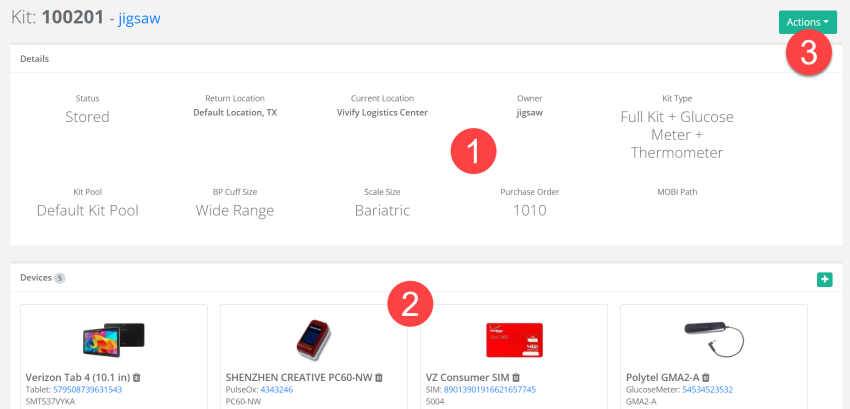
The Kit Details page includes all of the information about the kit, including the current status, devices, and history. This page is accessible from Kits > Kit List page.
The following information is available:
- Details – Dashboard containing the subsections Status, Return Location, Current Location, Owner, Kit Type, Kit Pool, BP Cuff Size, Scale Size, Purchase Order, and MOBI Path.
- Devices – Devices included in the kit and their serial numbers.
- Actions – List menu containing the options Edit Kit, Replacing Kit Components, Refresh MOBI Path, and Sync to Care Portal.
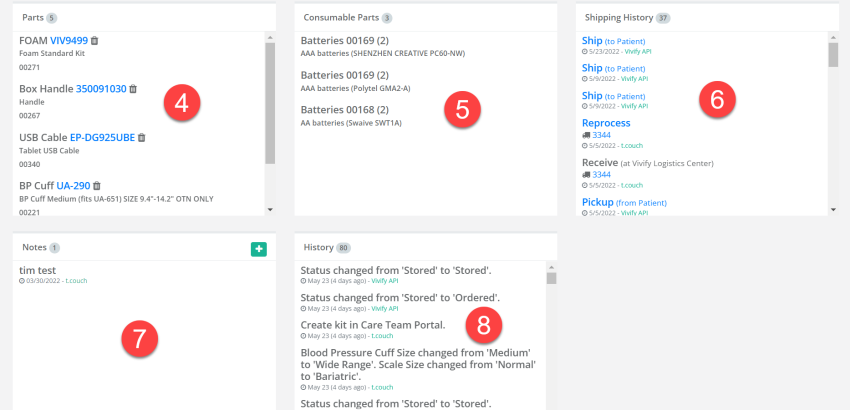
- Parts – Parts (components) included in the kit and their serial numbers.
- Consumable Parts – Consumable parts (components) included in the kit and their serial numbers.
-
Shipping History – Changes in the kit's shipping status.
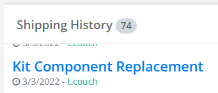
Note: The Shipping History card contains a backfill link to the relevant kit component replacement record.
- Notes – Any additional notes added by Care Team members.
- History – Status changes and interactions related to the kit.
 Yes
Yes  No
No